Its not new or exciting but it made me smile and thanks to this guy I will never forget how to do this off the top of my head, check it out:
Directory differential backup using xcopy
Tuesday, 29 November 2011

Friday, 25 November 2011
SCCM Collection based on executable name
Just a quick one to remind myself how to create a collection of computers that have a specific executable. Create a new collection and insert the following query:
select SMS_R_SYSTEM.ResourceID,SMS_R_SYSTEM.ResourceType,SMS_R_SYSTEM.Name,SMS_R_SYSTEM.SMSUniqueIdentifier,SMS_R_SYSTEM.ResourceDomainORWorkgroup,SMS_R_SYSTEM.Client from SMS_R_System inner join SMS_G_System_SoftwareFile on SMS_G_System_SoftwareFile.ResourceId = SMS_R_System.ResourceId where SMS_G_System_SoftwareFile.FileName = "vpngui.exe"
change the executable name to one of your choice, all done! :)
Friday, 18 November 2011
Canonical Names Of Control Panel Applets
Allowing access to control panel items via group policy in windows 7 is slightly different to XP and below, now instead of providing the name of the cpl file e.g main.cpl for the mouse you have to provide the canonical name of the applet e.g Microsoft.Mouse so here is a list of all of the Canonical names for future reference:
Canonical Names List
Canonical Names List
Friday, 16 September 2011
Case of the unexplained
I was doing a routine software install on a few machines the other day and the last one I came to was giving me this type of error:

I fired up process explorer and checked the stack for the process but couldn't see anything amiss. I tried rebooting, disabling the anti virus but nothing and then I remembered "When in doubt run process monitor".. . so I did and here is what I saw:

I saw loads of files in a folder in a random users profile being hit by this executable for some strange reason :-\
So... I browsed to the folder myself and found that there were LOADS of files and I mean LOADS and the last one this executable hit was no where near the end of the file structure.
So it seemed that the deep and complex file structure was stopping the installation. I tried to rename the folder but it wouldn't let me, cut and paste to another drive it wouldn't let me so I moved it temporarily inside the windows folder as I thought surely this installer wouldn't try to enumerate the contents of the entire drive.
I then re-ran the installer with this folder now located in C:\windows and lo-and-behold it worked!
Thankgod Mark Russinovich for procmon!

I fired up process explorer and checked the stack for the process but couldn't see anything amiss. I tried rebooting, disabling the anti virus but nothing and then I remembered "When in doubt run process monitor".. . so I did and here is what I saw:
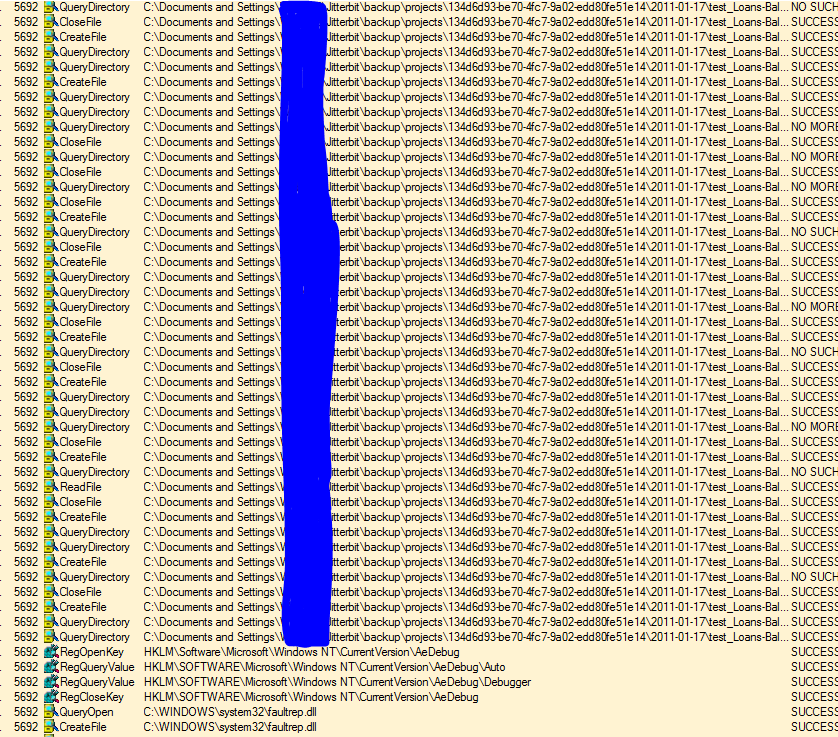
I saw loads of files in a folder in a random users profile being hit by this executable for some strange reason :-\
So... I browsed to the folder myself and found that there were LOADS of files and I mean LOADS and the last one this executable hit was no where near the end of the file structure.
So it seemed that the deep and complex file structure was stopping the installation. I tried to rename the folder but it wouldn't let me, cut and paste to another drive it wouldn't let me so I moved it temporarily inside the windows folder as I thought surely this installer wouldn't try to enumerate the contents of the entire drive.
I then re-ran the installer with this folder now located in C:\windows and lo-and-behold it worked!
Thank
Saturday, 20 August 2011
Cisco E4200 Router & 1080p Video streaming
Just a quick post to say that the Cisco E4200 CAN stream 1080p video with no problems using the 5GHZ Band.

I couldnt find this info out anywhere on the net and had to take the plunge and just buy this router and thank god it works beautifully :)
Currently I am streaming a 10GB+ 1080p MKV video across my network via this router straight to my Samsung Galaxy S2 and outputting to my HDTV.
So just to summarise incase anyone is wondering:
Samsung Galaxy S2 + Cisco E4200 = WIN! :)
Friday, 12 August 2011
Pre installing drivers during imaging
Recently I was faced with a challenge of how to pre install drivers for our universal USB docking stations so that a freshly imaged machine can just be handed out to a user without having to go through a manual install of the drivers beforehand.
The way I accomplished this was to use a utility found in the WDK (Microsoft Windows Driver Kit) called DpInst.exe
Here is the documentation for it:
WDK Documentation
At a high level all you basically have to do is get the drivers together in a folder with the correct version of DpInst (x86 / x64), build an XML file (called DPInst.xml) and then run it with a few switches to have it install the drivers for you. Then when a standard domain user comes along and plugs in the hardware it will automatically install it without asking for admin rights!
All you then have to do is build a package and include it in your SCCM task sequence to fully automate this tedious process :)
Thanks
Monday, 8 August 2011
How To Import duplicate drivers under different packages In SCCM 2007
I am currently working on building seperate Win 7 driver packages for all of our hardware and one of my colleagues came across an issue where he couldnt import a driver for a Toshiba Tecra A11 because it existed in another package.
I did some reading about how SCCM handles drivers and differentiates between them and wondered if adding an extra file into the folder would be enough to convince SCCM that it was different.
So, I added a file without an extension called "Toshiba Tecra A11 Windows 7 x64 N6200 Driver" and ran the import again and it worked!
Its not ideal and please tell me if there is a better way to do this , but it works beautifully :)
EDIT: I have just been informed by the fantastic Steve Beaumont that there IS a better way to do this, there is a hotfix available from Microsoft that allows you to import duplicate drivers:
Get the hotfix here
Subscribe to:
Posts (Atom)